The platform

The whole fire safety record for an estate, held in IGNIS

One live register of every building, assessment, action and inspection, with the evidence attached and the audit trail already written.

What makes IGNIS the platform estates teams keep

IGNIS was built inside a fire safety consultancy, against real duty cycles, real regulator returns and real audit questions.

Efficiency

Automate scheduling, action creation and reporting so the week goes on sites, not spreadsheets.

One live record

The logbook, the action register and every report read the same live records, so nothing you put in front of anybody is a snapshot that has already drifted.

Reliability

UK data residency, role-based access and a tamper-evident audit trail.

Regulatory currency

Updated as the Fire Safety Order and Building Safety Act duties change.

The Fire Logbook

One building. One record. Fourteen tabs that answer the question.

The logbook is the centre of IGNIS. Open a building and everything a responsible person is asked for is already assembled: what is due, what is open, who holds the duty, what was found, and where the evidence sits. Nothing is retyped, because the logbook reads from the same records the rest of the platform writes.

OverviewOverdue checks, open actions and equipment defects on one tile row, with an audit timeline and a plain list of what needs doing.
Building profileThe core record, use, height, storeys and units, with the last edit and who made it.
FloorplanPlans held against the building, with a readiness check on what is missing.
EquipmentEvery fire safety asset in the building, rolled up by type, with its service position.
InspectionsChecks due and checks completed, on the statutory interval for each asset class.
ActionsThe open action register for this building, whatever raised it.
Fire riskCurrent and archived fire risk assessments, each with its own count of actions still open.
PeopleWho is assigned to the building, their competence record, and which statutory roles are unfilled.
DocumentsEvidence held against the building, organised by golden thread category.
EventsReal fires, false alarms and observations logged against the building.
Visits and drillsRegulatory visits and evacuation drills, with the actions each one raised.
OccupancyFor multi-occupancy buildings: units, occupiers and engagement activity.
Dangerous substancesThe substance and storage location register for the building, where it applies.
Building safetyFor higher-risk buildings: the safety case record, golden thread coverage and accountable persons.

Counts and statuses in the logbook are operational indicators. They record what has been done. They are not a determination that a building is compliant or safe.

Capabilities

What the platform does today

Everything below is a screen a customer can open now. Work that exists only as backend services is in the roadmap, and labelled as not yet available.

Logbook

The building record that is already written

Most estates keep the logbook in a folder, a spreadsheet and somebody’s memory. IGNIS keeps it as one live page per building, assembled from the work your team is already doing, and ready to put in front of somebody the moment they ask.

  • Fourteen tabs covering the full duty cycle for one building
  • Reads from live records, so it cannot drift from the work
  • Higher-risk and multi-occupancy tabs appear only where they apply
  • Opened live in an inspection or a board meeting, with no pack to assemble first
  • Every figure labelled as an operational indicator, never as compliance
The IGNIS digital logbook for a higher-risk residential building, showing the tabbed record of the duty.
Scheduling

Every statutory check on its own interval

The scheduler holds the standard cadence for each asset class and lets you override it where your estate needs something tighter. Checks appear on a worklist, get done, and land back in the building logbook with the evidence attached.

  • Standard check intervals per asset class, with organisation overrides
  • A worklist per person, and inspection rounds for walk-order
  • Scan an asset tag to open the right check on the spot
  • Fails raise an action automatically, with the owner already set
  • Full history of what was checked, by whom, and when
The IGNIS statutory check record, with the standard each check is worked to stated against it.
Actions

One register, whatever raised the finding

A failed check, an assessment finding, a drill debrief and a hazard reported on a walk-around all land in the same action register, with the same owner, due date and closure evidence. There is one list to work, and one list to report on.

  • Actions from checks, assessments, drills, events and hazard reports in one place
  • Owner, due date and priority on every action
  • Closure needs evidence, not a tick
  • Ageing and closure rates by site, owner and category
  • Filter to a single building, or work the whole portfolio
The IGNIS people screen: users, roles and the named responsibilities each one holds.
Tagging

Tag the asset, and the record follows it

Fix a QR or NFC tag to an extinguisher, a panel or a door set and it becomes the way into that asset’s record. Field staff scan to open the check. Anyone else who scans gets a deliberately narrow public summary: enough to see the asset is looked after, not enough to hand somebody a survey of your weaknesses.

  • QR codes and NFC tags, assigned and retired from the asset record
  • Scan to open the asset: service history, next due, open defects
  • A commissioning mode for tagging a whole building in one pass
  • Public scan shows check names, status and next-due dates only
  • Defects appear as a severity band and an age band, never exact figures
  • Retired tags, unassigned tags and suspended accounts all fail closed

We supply the tags. Aspis prints and ships the QR and NFC labels for your estate, and you assign them to assets in IGNIS.

The IGNIS fire asset register, with QR and NFC tag status against each item of equipment.
Higher-risk buildings

Your golden thread, held in order

For higher-risk buildings, IGNIS holds the safety case record and the golden thread information store described at section 88 of the Building Safety Act 2022: versioned items, coverage against a defined requirement set, and actions raised where coverage is short.

  • Safety case register, per higher-risk building
  • Golden thread items with supersede-and-version history
  • Coverage recorded against each information requirement
  • Actions linked to the specific requirement they close
  • Accountable persons and unfilled statutory roles surfaced
  • Resident engagement recorded as activity, holding no resident personal data

IGNIS records and organises. It does not submit to the Building Safety Regulator, does not issue a Building Assessment Certificate, and does not determine whether a duty has been met.

The IGNIS golden thread information store for a higher-risk building: the information register with each item versioned and dated, the indicative requirement checklist, and the activity timeline behind it.
Assessments

Record the assessment, inherit the actions

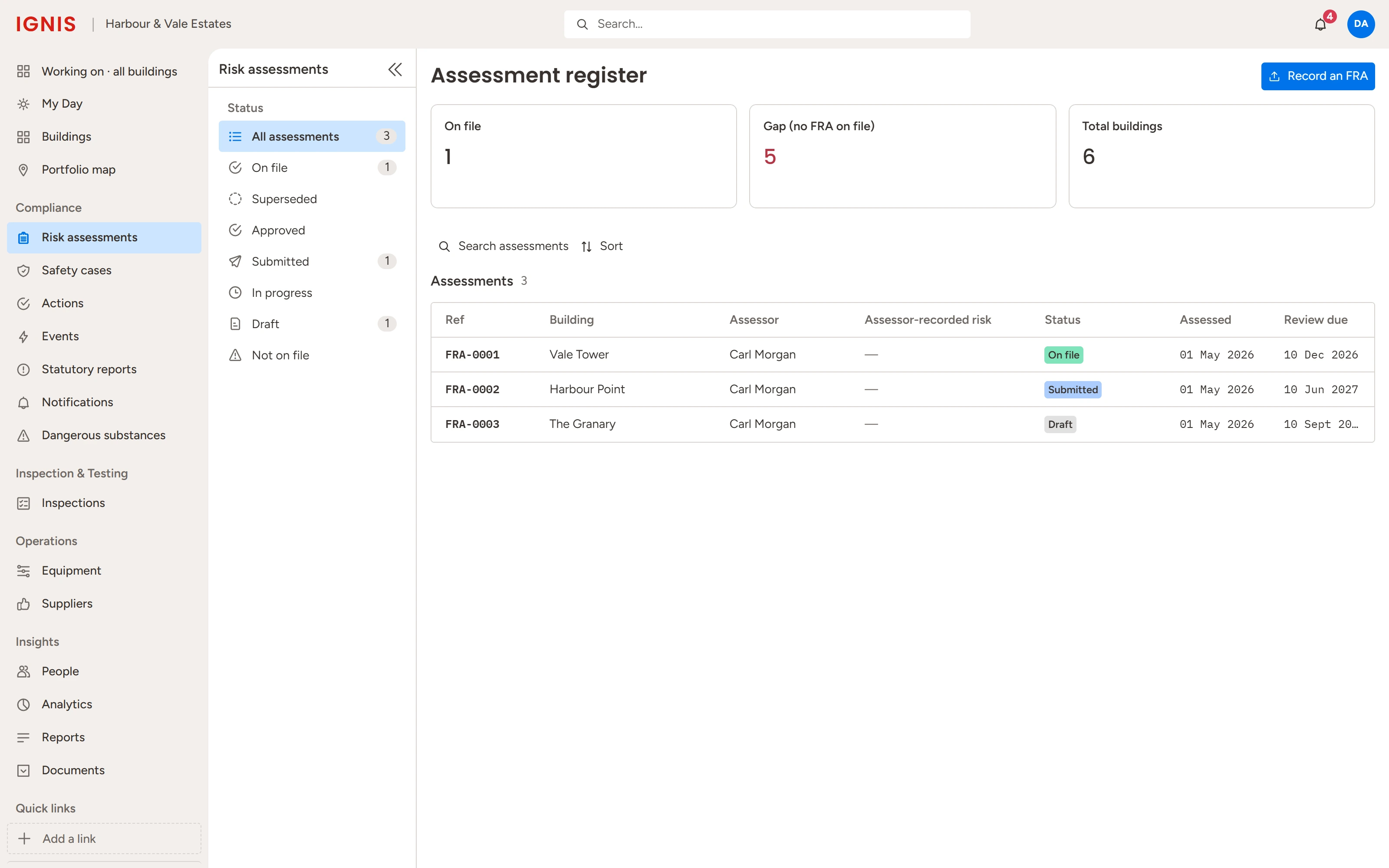
Record a fire risk assessment against a building, your own or one an external assessor carried out, and its findings become owned, dated actions straight away. The assessment stays attached to the building, current and archived versions both, with its open actions counted against it.

  • Record assessments carried out by your team or an external assessor
  • Findings become actions with an owner and a due date
  • Current and archived assessments held against the building
  • Open action count per assessment, so a closed-out assessment is visible
  • Review dates tracked, so a lapsed assessment surfaces

A full guided assessment authoring workspace is in build. See the roadmap below.

The IGNIS fire risk assessment record: assessments per building with review dates and the findings they raised.
Evidence

The proof, filed where somebody will look for it

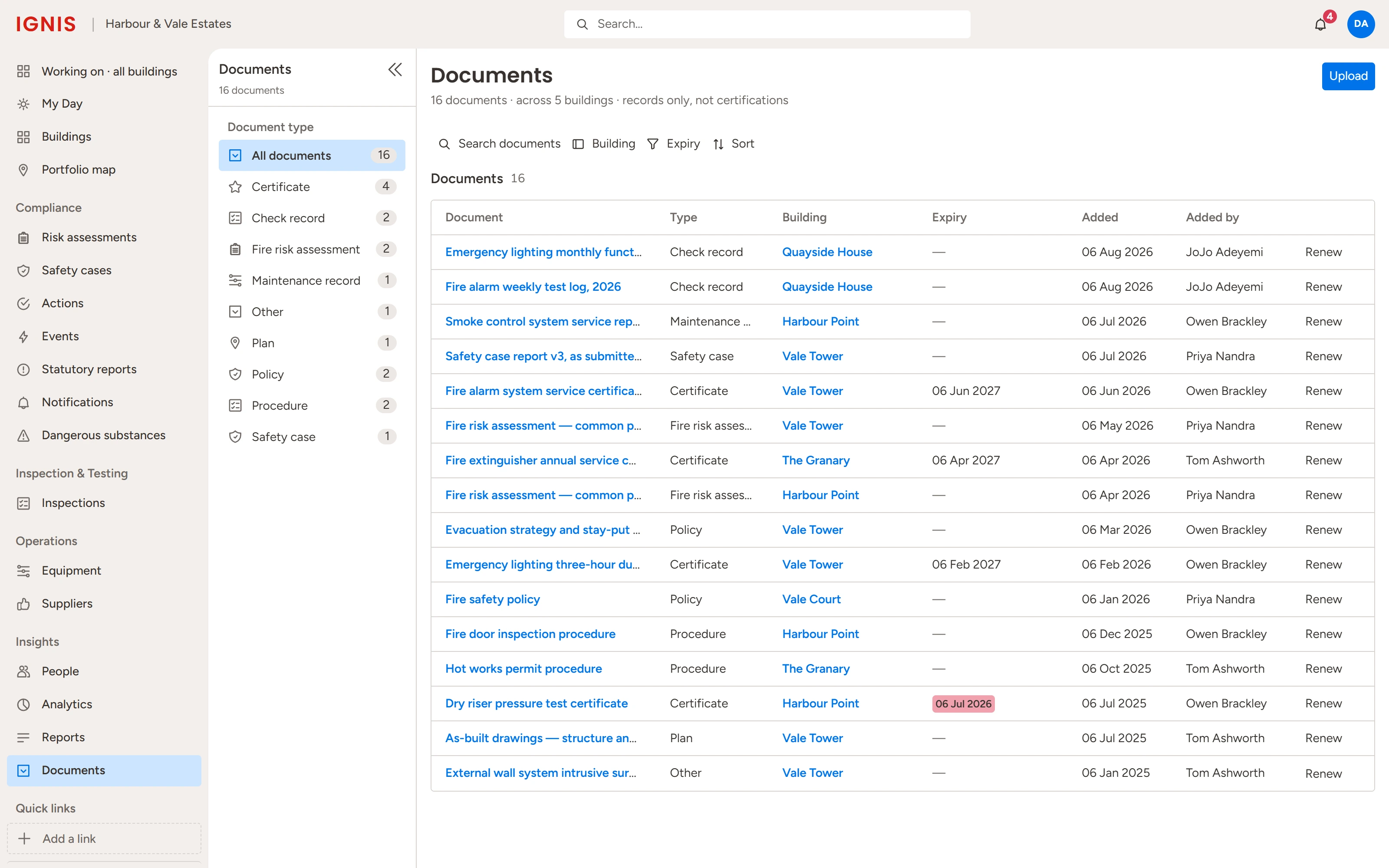
Certificates, reports, photographs and plans held against the building and against the action they close, organised by golden thread category, so an inspection request is a filter rather than a fortnight.

  • Documents held against buildings, assets and actions
  • Organised by golden thread category
  • Attached at the point of work, from the field or the desk
  • Role-based access throughout
  • UK data residency
The IGNIS document register: certificates, plans, policies and reports held against the building they belong to, grouped by document type.
Reporting

Answer the board without building a spreadsheet

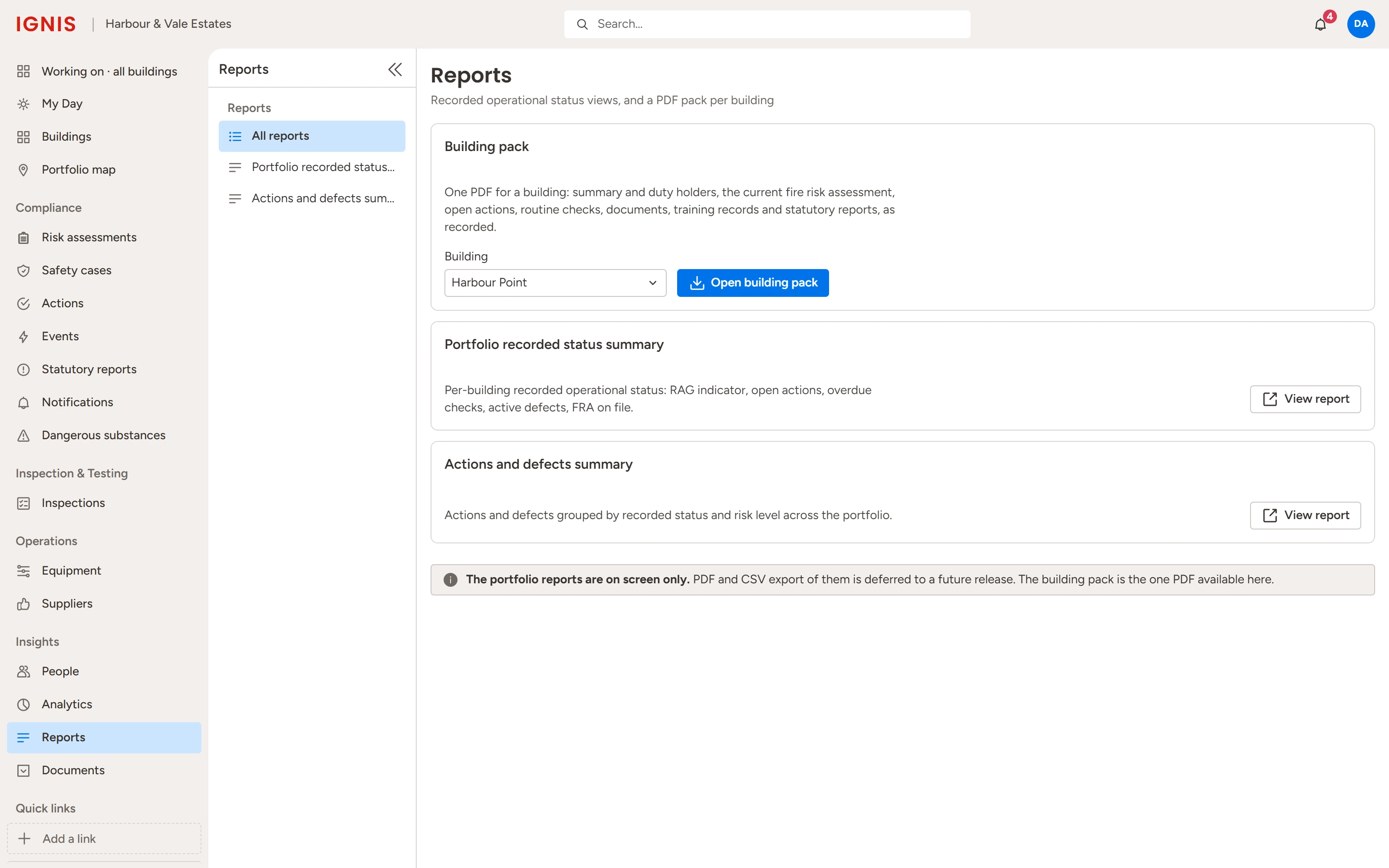
Closure rates, ageing profiles, inspection load and risk movement across the portfolio, drawn from the same live records as everything else. Filter to a site, a duty, an owner or a period, then drill from the figure to the record behind it.

  • Portfolio analytics across buildings, actions and checks
  • Closure rate and ageing by site, owner and category
  • Inspection load and activity trend over time
  • Portfolio map view of the estate
  • Board, insurer and regulator views drawn from the live record
IGNIS reporting, generated from the same record the team works from rather than from a separate return.
On site

The screens the work actually happens in

The people who carry out checks are standing in front of a panel, not sitting at a desk, so IGNIS has field screens built for that job rather than the desktop pages shrunk down. They open on what is overdue. Scanning the tag on an asset opens the right check against the right asset, with the standard it is worked to already on screen. A fail raises an action there and then. They write to the same record the office reads, so nothing has to be reconciled afterwards.
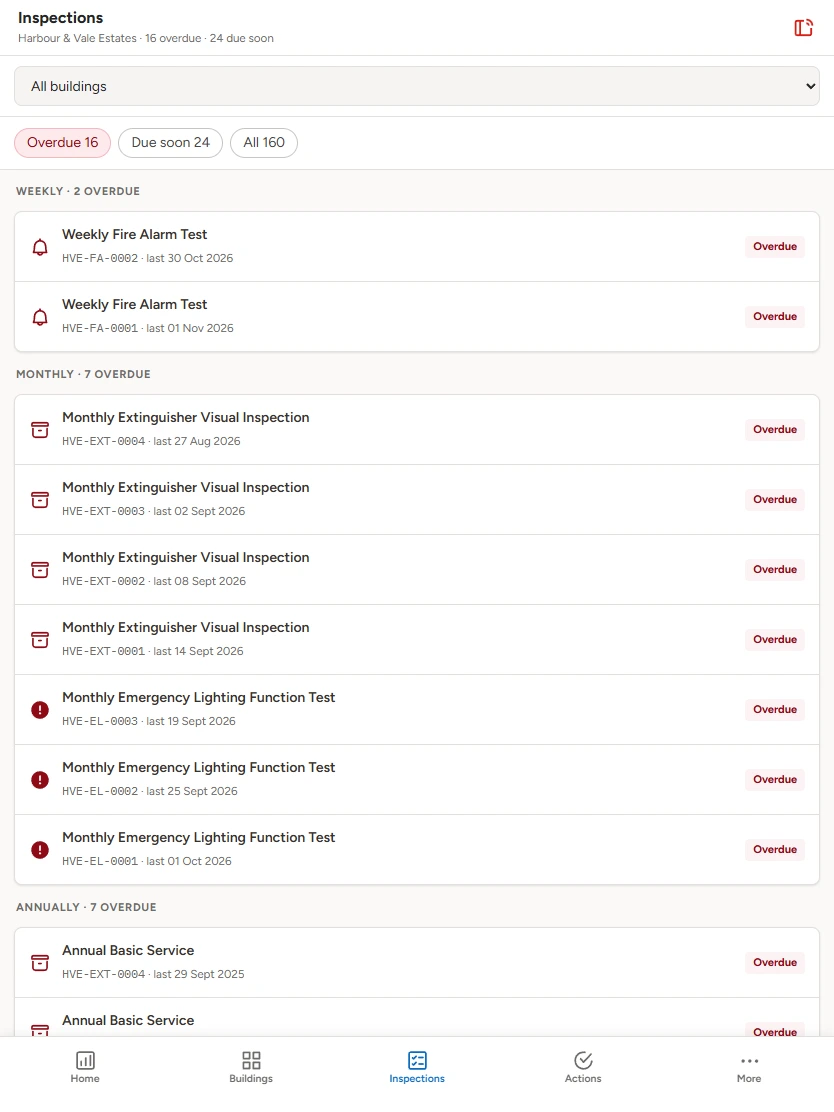
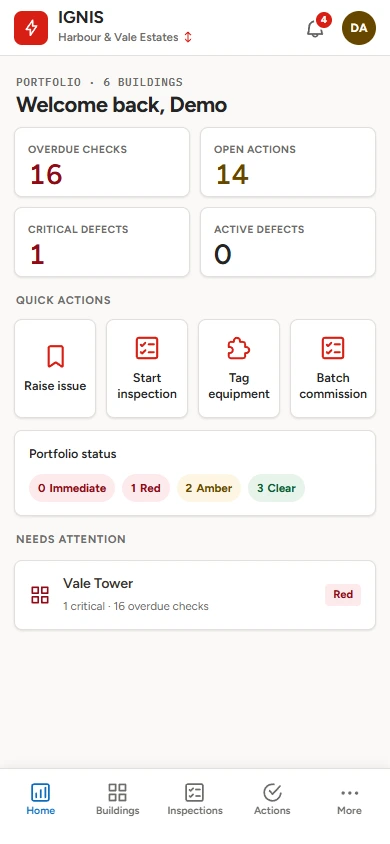
  • Opens on the overdue count, not on a menu
  • Scan an NFC or QR tag to open the check for that asset
  • Photo evidence attaches at the point of work
  • A round stays a draft until it is submitted, so a half-walked building is never a record
  • A failed check raises an action with an owner already set
  • Same login, same record, no separate copy of the data
The IGNIS field screens on a tablet: the checks due, grouped by interval.The IGNIS field screens on a phone: the portfolio at a glance, with overdue checks, open actions and the quick actions a caretaker starts from.
The IGNIS field screens on a tablet and a phone, captured from the running product

These field screens run in the browser on any phone or tablet today. A native Android app working on the same record is in development. It is not yet on the Play Store, and there is no iOS app.

The roadmap

One system, built in three stages

IGNIS has been in development since December 2025. The end state is a single end-to-end system: the digital logbook that records the duty, a fire risk assessment engine that authors the assessment itself, and maintenance management with field scheduling for the people who carry the work out. We are building it in that order, and we will tell you where each stage is rather than let you find out in a demo.

Eleven monthsIn continuous development since December 2025, inside a working fire safety consultancy.
  1. At launch

    The Digital Logbook

    Shipping

    The building record, the statutory check schedule, the action register, asset tagging, documents and reporting. This is what you buy today, and it is the spine everything after it attaches to.

    • Fourteen logbook tabs covering the full duty cycle
    • Statutory check intervals per asset class, with overrides
    • One action register, whatever raised the finding
    • QR and NFC tags from the asset to the right check
    • Documents and golden thread evidence, with the audit trail
  2. Mid 2027

    The Fire Risk Assessment Engine

    In build

    Today IGNIS records a fire risk assessment and turns its findings into actions. The engine brings the assessment itself into the platform: a guided, standards-referenced workspace so a competent assessor carries out and issues the assessment without leaving the record it belongs to.

    • Guided assessment structured on the recognised methodologies
    • Premises and jurisdiction routing, so the right questions are asked
    • Findings traced back to the source that raised them
    • Competence gating, so only a competent person can issue
    • Issued assessments flow into the logbook as recorded ones do today
  3. End 2027

    Maintenance and Field Management

    In build

    Statutory checks are live today. This is the layer above them: planned maintenance, the contractors and engineers who deliver it, and the field scheduling to get them to the right building. It runs like a CRM, against the same action register.

    • Planned maintenance schedules per asset and system
    • Contractor and engineer records with competence requirements
    • Field scheduling, dispatch and job history per engineer
    • Service records captured on site by scanning the asset tag
    • Certificates filed against the asset and the golden thread
    • A contractor portal, so the people doing the work can see it

The dates above are our current plan, not a contractual commitment. A stage ships when it is finished and tested. Neither of the later two is available to customers today, and neither is included in a subscription until it ships.
Every closed action starts with a record

Not ready for a demo? Ask us anything at [email protected]